


BTCC - Trade Bitcoin & Crypto
4.64.60K Reviews
App Specs
- Version
- 8.9.93
- Updated On
- License
- Free
- Downloads
- 1,000,000+
- Developer
- BTCC.COM
- Categories
- Finance
- Platform
- Android, iOS
Screenshots
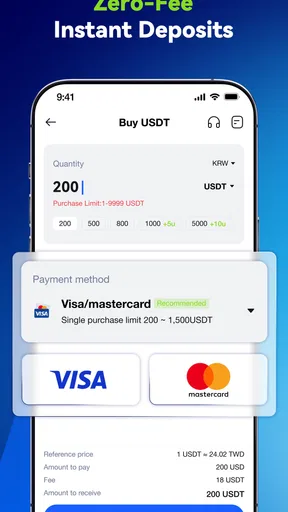
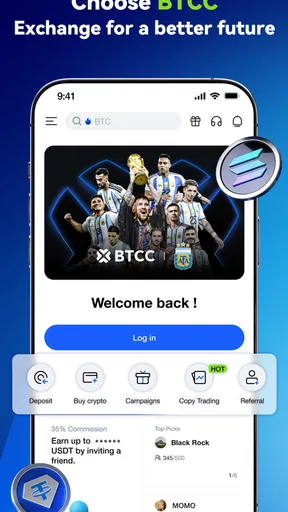

 Analysis by AppCompare
I approach BTCC - Trade Bitcoin & Crypto as a place to manage crypto trading, not as a shortcut to making money. That distinction matters: an exchange app can make placing an order easier, but it cannot make a volatile asset predictable. BTCC is a finance app from BTCC.COM, and its appeal is the chance to keep market access and trading tools together on a phone. I would consider it most useful for someone who already wants to trade digital assets and is willing to learn what each order and market screen means before committing funds.
The app is free to download, has an Everyone age rating, and has been available since August 4, 2020. Its current version is 8.9.85, and the minimum operating system is Android 8.0. Those facts give a little context about its history and compatibility, but a version number alone does not tell me what changed in a particular release. I wouldn’t assume that every screen or feature has stayed identical over time; I’d check the installed app’s current interface and release notes before relying on a workflow I remember.
What BTCC Feels Like to Use
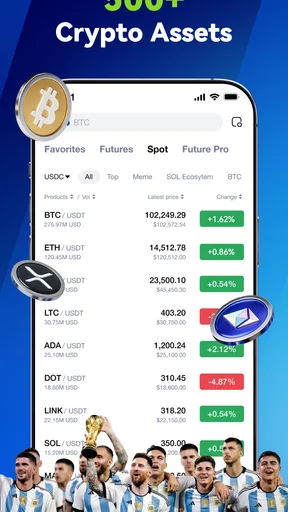
The overall proposition is familiar for a crypto exchange: access a range of coins, follow market movement, and make trading decisions from one mobile interface. Bitcoin, Ethereum, XRP, and Solana are among the assets named in the app’s trading summary. That can be convenient if you want to follow more than one market without switching between separate apps, though availability and the exact trading options should be checked in the app for your account and region.
On a phone, the central trade-off is speed versus attention. Keeping prices and trading controls close at hand can help when you want to check a market during a break, but that convenience also makes impulsive decisions easier. I’d treat notifications and quick access as prompts to review a plan, not as instructions to buy or sell. If I were new to crypto, I’d first learn the difference between an asset’s price chart and an order screen, then practise navigating without placing a real trade.
BTCC has an average rating of 4.6 from around 17,000 ratings, and it has passed one million installs. That suggests a sizeable audience, but popularity is not a substitute for checking whether the app suits your habits. Ratings can reflect very different expectations: a frequent trader may care most about chart access, while a cautious long-term holder may care more about custody choices and withdrawal arrangements.
Choosing a Trading Routine That Fits
A useful everyday scenario is checking a position during a commute or lunch break, then deciding not to act until you have time to review it properly. I find that approach healthier than treating every price movement as a signal. If you use BTCC this way, decide in advance what you want to monitor and what would justify a trade. A short written plan can help prevent a quick glance at a chart from turning into a rushed order.
For a beginner, the most helpful first task is not buying a coin; it is learning where the app places the information needed to understand a trade. Identify the selected asset, the order controls, and any displayed costs before proceeding. Check that you are looking at the market you intended to view, especially when several coins are available. Taking those small steps reduces avoidable mistakes without requiring advanced trading knowledge.
Worth Reading Before You Choose

EA SPORTS FC Mobile 26 Is a Bigger Football Game, but It Takes Time

Flipboard Shows What News Apps Must Do Beyond the Feed

Switching to Android Auto Means Rethinking Your Driving Routine

Google Calendar Makes a Crowded Week Easier to Manage

Ludo King Makes the Most of the Minutes Between Plans

Baby Panda World Brings Quick Play to Modern Phones, but Its Game Library Feels Busy
For someone who trades actively, a mobile exchange can be handy for monitoring markets away from a desk. It is less compelling if you depend on a large screen to compare several charts or carefully inspect data. A dedicated desktop platform may be a better fit for detailed analysis, while a simple price-tracking app may be enough for someone who only wants occasional market checks. BTCC makes most sense when you actually want exchange access on your phone, rather than merely a watchlist.
What to Check Before Placing an Order
Before entering a trade, I’d slow down and confirm the asset, the order details, and the amount at risk. A familiar coin name is not enough: the precise market and order type matter. If the app presents more than one way to trade, read the labels rather than assuming that every option works like a straightforward purchase. The difference between understanding a screen and tapping through it can be significant when real money is involved.
Fees and funding deserve the same care. The cost of a trade can affect the result even when the market moves in the direction you expected. I would review the current fee information inside the app before comparing it with another exchange, and check the applicable deposit or withdrawal conditions before moving money. Those details can vary, so a claim that an exchange is inexpensive should never replace looking at the cost for the transaction you plan to make.
It is also sensible to decide how you will keep records. If you trade more than once, jotting down the reason for an order and the amount involved can make later review much clearer. That habit is useful even if the app shows your activity, because a transaction history tells you what happened, while a brief personal note can explain why you made the decision. It can also reveal whether you are following a plan or reacting to short-term noise.
How It Compares with Other Crypto Apps
Compared with a basic portfolio tracker, BTCC is aimed at people who want trading access rather than just a place to observe balances or prices. Compared with a general finance app, it is more specialised around cryptocurrency markets. That focus is a benefit if you want a dedicated trading environment, but it may be unnecessary if your main goal is budgeting, tracking investments across different asset classes, or checking prices without the ability to trade.
Other exchanges may suit you better if they offer the specific markets, funding methods, regional availability, or account protections that matter to you. I wouldn’t choose solely by comparing coin names or headline fees. The practical questions are whether you can use the service where you live, whether the trading method matches your needs, and whether you understand how funds move into and out of the account. If those answers are unclear, pause and check before transferring money.
A self-custody wallet is a different kind of alternative, not simply another exchange with a different layout. An exchange is designed around buying and selling through its service; a wallet puts more responsibility for managing access in the user’s hands. Someone focused on holding assets independently may prefer to research wallet options, while someone who wants an exchange interface may prefer BTCC or another trading app. The right choice depends on what you need to do, not on which app has the most buttons.
Limits, Caution, and Account Questions
The biggest limitation is not a missing convenience feature; it is the risk inherent in trading crypto. Prices can move sharply, and an easy-to-use phone interface can encourage frequent checking and overtrading. I would not recommend BTCC to anyone who expects steady returns, needs money to remain stable, or is uncomfortable with the possibility of losses. It is also not the right tool for someone who simply wants a low-effort savings account.
Before signing up, I’d check which identity and account steps apply to me, what payment and withdrawal routes are available, and what security options the current app offers. These are practical questions because a trading app’s usefulness depends on being able to access and manage an account reliably. I’d also use a strong, unique password and protect the email account tied to any financial service. Good account habits matter even when an app presents a polished interface.
Users often want to know whether they can begin without immediately risking money. The sensible answer is to explore the interface first and use any practice option only if it is available in the version and account setup they have. A practice environment can teach order mechanics, but it cannot reproduce the emotions of risking real funds or guarantee a real-world result. I would treat it as a learning aid, not proof that a strategy will work.
Another common question is whether a phone is enough for serious analysis. For simple monitoring and occasional actions, it may be; for comparing complex information or reviewing several markets in depth, I prefer a larger screen and more deliberate setup. And if you are wondering whether to leave assets on an exchange, consider your intended use and the risks of relying on any single service. Learn how withdrawals and personal custody work before deciding where to keep funds.
Getting Started with Ease
First up, let’s talk about the user experience. Right off the bat, BTCC scores high marks for its intuitive interface. Setting up an account is a breeze. I was pleasantly surprised to find that the registration process is straightforward, and they don’t bombard you with too many details. Just the essentials to get you started.
Once you're in, the dashboard is clean and uncluttered. I loved how everything is neatly organized, making it easy to jump into trading without feeling overwhelmed. For beginners, this is a huge plus. I remember my first time trying to trade crypto; the learning curve was steep. But with BTCC, it’s like they’re holding your hand through the process.
Features That Shine
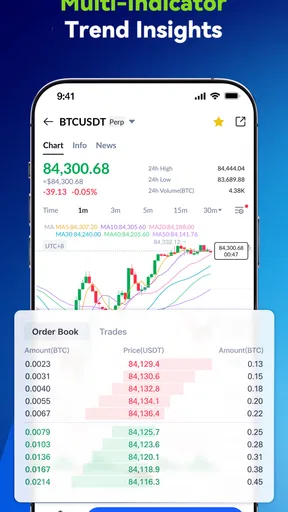
Now, let’s get into the features that stand out. One of the app's highlights is its comprehensive charting tools. Whether you're a seasoned trader or a newbie, having access to detailed charts and analytics is invaluable. The app provides real-time data, which is a game-changer when making those crucial trading decisions.
Another feature that caught my attention is the variety of cryptocurrencies available for trading. From Bitcoin to Ethereum and beyond, BTCC offers a broad spectrum of options. This diversity allows you to explore and invest in various coins, broadening your crypto horizons.
Security is always a major concern with cryptocurrency, and BTCC doesn’t disappoint. They employ top-notch security measures, ensuring your assets and personal information are safeguarded. I found peace of mind knowing that my investments are protected.
Trading Made Simple
Trading on BTCC is as smooth as butter. The app offers both spot and futures trading, catering to different trading styles and preferences. I particularly enjoyed the demo account feature, which lets you practice trading without risking real money. It's perfect if you’re still finding your feet.
The transaction process is quick and efficient. Depositing and withdrawing funds is hassle-free, with multiple payment options available. I appreciated the low trading fees, which means more profit in your pocket. Every penny counts, right?
Community and Support
One thing I always look for in an app is the support system. BTCC shines here with its active community and responsive customer service. Whether it's a question about trading or a technical issue, their support team is just a tap away. I had a minor hiccup with my account, and they resolved it promptly.
Moreover, the app offers a wealth of educational resources. From beginner guides to advanced strategies, there’s something for everyone. It’s like having a crypto mentor in your pocket, guiding you every step of the way.
Wrapping It Up
All in all, BTCC - Trade Bitcoin & Crypto is a solid choice for anyone looking to dive into the world of cryptocurrency trading. It’s user-friendly, feature-rich, and backed by a supportive community. Whether you’re just starting out or you’re a seasoned trader, this app has got you covered.
With its robust security, diverse trading options, and excellent support, BTCC stands out in the crowded crypto app market. So, if you're ready to explore the thrilling world of digital currencies, give BTCC a whirl. Happy trading!
Pros
- User-friendly interface for beginners.
- Wide range of supported cryptocurrencies.
- Real-time market data updates.
- Secure transactions with robust encryption.
- Competitive trading fees.
Cons
- Limited customer support options.
- Occasional app performance issues.
- Geographic restrictions apply.
- In-app notifications can be overwhelming.
- Advanced features may confuse novices.
FAQs for BTCC - Trade Bitcoin & Crypto
What features does the BTCC app offer for trading cryptocurrencies?
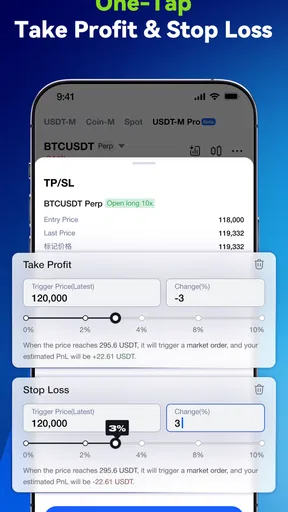
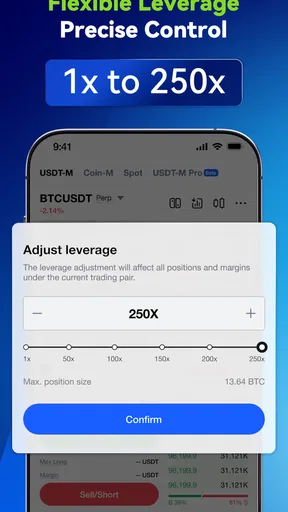
The BTCC app provides a comprehensive platform for trading a wide range of cryptocurrencies including Bitcoin, Ethereum, and more. It offers real-time market data, advanced charting tools, and customizable trading options. Users can benefit from features like stop-loss orders, leverage trading, and access to historical data, making it suitable for both beginners and experienced traders.
Is BTCC a secure platform for cryptocurrency trading?
BTCC prioritizes user security with robust measures in place. It uses advanced encryption protocols, two-factor authentication (2FA), and cold storage for digital assets to protect user funds. Regular security audits are conducted to ensure the platform remains secure against potential threats, providing users with peace of mind while trading.
Are there any fees associated with using the BTCC app?
Yes, the BTCC app charges competitive trading fees, which may vary depending on the type of transaction. There are fees for trading, deposits, and withdrawals. Users should review the fee schedule within the app to understand the costs associated with their trading activities. Reduced fees may be available for high-volume traders.
Can I use the BTCC app for trading on mobile devices?
Absolutely! The BTCC app is designed to provide a seamless trading experience on both Android and iOS devices. The mobile app offers all the functionalities of the desktop version, including real-time market updates, trading tools, and account management features, enabling users to trade on the go with ease.
What kind of customer support does BTCC offer?
BTCC offers dedicated customer support available 24/7. Users can reach out via email, live chat, or through the in-app support feature. The support team is knowledgeable and can assist with technical issues, account inquiries, and any other questions users might have, ensuring a smooth and supportive trading experience.


